Wenn Ihr Samsung-Trockner keine Wärme mehr erzeugt, beginnen Sie mit einigen einfachen Kontrollen. Prüfen Sie zunächst, ob der Trockner überhaupt Wärme abgibt oder Fehlercodes anzeigt. Testen Sie als Nächstes das Heizelement auf Defekte. Ziehen Sie vor jeder Inspektion oder Reparatur stets den Stecker des Trockners. Wenn Sie unsicher sind oder größere Schäden feststellen, wenden Sie sich zu Ihrer Sicherheit an einen qualifizierten Techniker.
Tipp: Sicherheit geht vor. Schalten Sie den Trockner vor der Fehlersuche niemals aus, ohne ihn vom Stromnetz zu trennen.
Häufige Anzeichen dafür, dass ein Samsung-Trockner nicht heizt
Wenn Ihr Samsung-Trockner heizt nicht wird zu einem Problem, werden Ihnen mehrere deutliche Warnzeichen auffallen. Wenn Sie diese früh erkennen, können Sie größere Probleme vermeiden und Ihren Wäschetrockner effizient am Laufen halten.
Nicht ordnungsgemäß trocknende Kleidung
Feuchte oder nasse Wäsche nach einem vollständigen Trocknungsgang
Sie erwarten, dass Ihre Wäsche nach einem Programm trocken ist. Wenn Sie feuchte oder nasse Wäsche vorfinden, erzeugt Ihr Trockner möglicherweise nicht genug Wärme. Dies ist eine der häufigsten Ursachen für einen Samsung-Trockner heizt nicht. Sie sollten die Beladungsmenge überprüfen und sicherstellen, dass Sie die Maschine nicht überladen haben. Überladung kann den Luftstrom beeinträchtigen und die Trocknungseleistung verringern.
Längere Trocknungszeiten als üblich
Wenn Ihr Wäschetrockner für die gleiche Wäschemenge deutlich länger braucht, deutet dies auf ein Heizproblem hin. Möglicherweise stellen Sie fest, dass Sie mehrere Durchläufe benötigen, um die Wäsche zu trocknen. Dies verschwendet nicht nur Energie, sondern belastet auch Ihren Trockner zusätzlich.
Hinweis: Durchgehend lange Trocknungszeiten können auf ein Problem mit dem Heizelement oder Luftstromstörungen in Ihrem Samsung-Trockner hinweisen.
Keine Wärme vom Samsung-Trockner
Trockner läuft, erzeugt aber keine Wärme
Manchmal schaltet sich Ihr Trockner ein und dreht sich wie gewohnt, aber Sie spüren keine Wärme im Inneren. Dies ist ein klassisches Anzeichen dafür, dass ein Samsung-Trockner nicht heizt. Die Trommel dreht sich, aber das Heizelement aktiviert nicht. Sie sollten ausgelöste Sicherungen oder durchgebrannte Sicherungen überprüfen. Sind diese in Ordnung, ist wahrscheinlich das Heizelement defekt.
Es strömt kalte statt warme Luft aus
Wenn Sie während eines Programms kalte Luft aus Ihrem Wäschetrockner strömen spüren, funktioniert das Heizsystem nicht wie vorgesehen. Dies kann passieren, wenn das Heizelement gebrochen ist oder ein Problem mit dem Thermostat oder der thermischen Sicherung vorliegt.
Fehlercodes und Warnleuchten
Häufige Samsung-Trockner-Fehlercodes im Zusammenhang mit der Heizung
Moderne Samsung-Trockner zeigen Fehlercodes an, wenn etwas nicht stimmt. Der ‘Fehlercode ’HE‘ ist einer, den Sie möglicherweise sehen, wenn Ihr Trockner überhitzt oder das Heizelement ausfällt. Dieser Code bedeutet, dass Sie das Heizelement, den Thermistor und das Abluftsystem überprüfen müssen. Der Thermistor, der die Temperatur misst, sollte bei Raumtemperatur einen Widerstand von etwa 10 kΩ haben.
Was die Codes für das Heizelement bedeuten
Wenn Sie den ‘HE’-Code sehen, teilt Ihnen Ihr Trockner mit, dass ein Heizproblem vorliegt. Experten empfehlen, zunächst das Abluftsystem und den Flusensieb zu überprüfen . Verstopfte Abluftöffnungen können Überhitzung verursachen und den Fehler auslösen. Besteht das Problem weiter, müssen Sie möglicherweise den Thermistor oder das Heizelement ersetzen. Der Thermistor steuert die Funktion des Zyklusthermostaten, daher kann auch ein defekter Sensor Heizprobleme verursachen.
Tipp: Reinigen Sie stets den Flusensieb und prüfen Sie das Abluftsystem, bevor Sie mit komplexeren Reparaturen fortfahren.
Schritt-für-Schritt-Fehlerbehebung am Heizelement des Samsung-Trockners
Sicherheit zuerst
Trockner vom Stromnetz trennen
Bevor Sie mit der Fehlersuche beginnen, ziehen Sie stets den Stecker Ihres Trockners aus der Steckdose. Dieser einfache Schritt schützt Sie vor Stromschlägen und verhindert Unfälle. Jedes Jahr, entstehen über 15.500 Brände durch Trocknerabluftsysteme, oft aufgrund von Flusenansammlungen und mangelnder Wartung. Das Trennen vom Stromnetz vor Reparaturen ist eine entscheidende Sicherheitsmaßnahme, die das Risiko von Elektrounfällen verringert.
Tipp: Trennen Sie Ihren Trockner niemals aus, ohne ihn vom Strom zu nehmen. Selbst wenn Sie ihn nur inspizieren möchten, schützt Sie das Trennen der Stromversorgung.
Tragen von Schutzkleidung
Du solltest Tragen Sie Handschuhe und Schutzbrille , wenn Sie an Ihrem Trockner arbeiten. Isolierte Werkzeuge helfen, Stromschläge zu vermeiden. Stellen Sie sicher, dass Ihr Arbeitsbereich sauber und frei von Gefahren ist. Überprüfen Sie Ihre Werkzeuge vor Gebrauch auf Beschädigungen. Diese Vorsichtsmaßnahmen helfen Ihnen, Verletzungen zu vermeiden und den Reparaturprozess reibungsloser zu gestalten.
- Tragen Sie Handschuhe, um Ihre Hände vor scharfen Kanten zu schützen.
- Verwenden Sie eine Schutzbrille, um Ihre Augen vor Staub und Schmutz zu schützen.
- Wählen Sie isolierte Werkzeuge für zusätzlichen Schutz.
Zugang zum Heizelement in einem Samsung-Trockner
Lokalisieren des Heizelements
Das Heizelement befindet sich bei den meisten Samsung-Trocknern auf der Rückseite oder der Unterseite. Konsultieren Sie Ihr Benutzerhandbuch für die genaue Position. Das Heizelement sitzt in einem Metallgehäuse, normalerweise in der Nähe des Gebläsesatzes. Wenn Sie Schwierigkeiten haben, es zu finden, suchen Sie nach einer großen Metallplatte auf der Rückseite des Trockners.
Abnehmen der Rück- oder Frontplatte
Um Zugang zum Heizelement zu erhalten, müssen Sie entweder die Rück- oder die Frontplatte entfernen. Bei den meisten Samsung-Trocknern müssen Sie die Rückplatte abschrauben. Behalten Sie alle Schrauben und Teile im Blick, während Sie sie entfernen. Bei einigen Modellen kann es konstruktionsbedingte Herausforderungen, geben, wie z.B. leicht beschädigbare Kunststoffteile oder schwer zu entfernende Abdeckungen. Wenn Sie auf Widerstand stoßen oder Anzeichen eines mechanischen Defekts sehen, ziehen Sie professionelle Hilfe in Betracht.
- Ziehen Sie den Netzstecker des Trockners.
- Entfernen Sie die Schrauben von der Rückplatte.
- Heben Sie die Platte vorsichtig ab, um die inneren Komponenten freizulegen.
- Legen Sie alle Schrauben und Teile an einem sicheren Ort beiseite.
Anmerkung: Einige Nutzer berichten, dass interne Komponenten aufgrund von Konstruktionsmängeln schwer zugänglich sein können. Wenn Sie unsicher sind, zwingen Sie keine Teile.
Visuelle Inspektion des Heizelements
Sichtbare Beschädigungen oder Brüche suchen
Sobald Sie Zugang zum Heizelement haben, inspizieren Sie es genau. Suchen Sie nach sichtbaren Brüchen, Rissen oder Brandflecken auf den Heizwendeln. Beschädigte oder gebrochene Wendeln zeigen an, dass das Element nicht richtig heizen kann und ausgetauscht werden muss.
Auf verbrannte oder gebrochene Wendeln prüfen
Untersuchen Sie die gesamte Länge des Heizelements auf Anzeichen von Verbrennungen oder gebrochenen Drähten. Verbrannte Stellen oder geschmolzene Bereiche zeigen, dass das Element überhitzt ist. Wenn Sie eines dieser Probleme feststellen, sollten Sie das Heizelement ersetzen, um die Funktion Ihres Trockners wiederherzustellen wiederherzustellen.
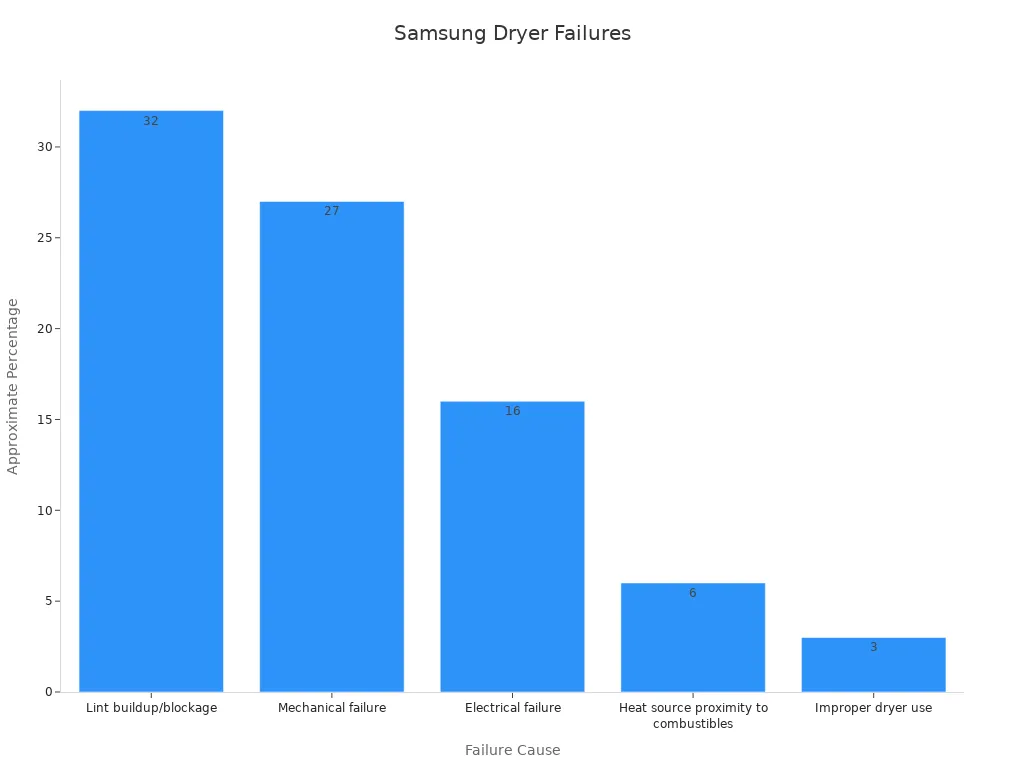
Aufbieten, ausrufen, zurufen: Laut aktuellen Statistiken sind, Flusenansammlungen und mechanische Defekte für fast 60 % der Heizungsausfälle bei Samsung-Trocknern verantwortlich. Regelmäßige Inspektion und Reinigung können viele dieser Probleme verhindern.
| Ursache | Ungefährer Prozentsatz |
|---|---|
| Flusenansammlung/-verstopfung | 32% |
| Mechanischer Defekt | 27% |
| Elektrischer Defekt | 16% |
| Nähe der Wärmequelle zu brennbaren Materialien | 6% |
| Unsachgemäße Nutzung des Trockners | 3% |
Indem Sie diese Schritte befolgen, beheben Sie die häufigsten Ursachen für Heizprobleme bei Ihrem Samsung-Trockner. Wenn Sie keine sichtbaren Schäden finden, fahren Sie mit elektrischen Tests und weiterer Fehlersuche fort.
Testen des Heizelements mit einem Multimeter
Einrichten des Multimeters
Um Ihren Samsung-Trockner genau zu diagnostizieren, müssen Sie das Heizelement mit einem Multimeter testen. Stellen Sie Ihr Multimeter zunächst auf den niedrigsten Widerstandsbereich ein, der normalerweise mit “Ω” für Ohm gekennzeichnet ist. Diese Einstellung ermöglicht es Ihnen, die elektrische Durchgangsfähigkeit zu prüfen. Stellen Sie sicher, dass der Trockner während dieses Vorgangs vom Stromnetz getrennt bleibt, um einen Stromschlag zu vermeiden.
- Drehen Sie den Drehschalter des Multimeters auf die niedrigste Ohm-Einstellung.
- Berühren Sie die beiden Prüfspitzen miteinander. Die Anzeige sollte nahe Null anzeigen, was die Funktion des Geräts bestätigt.
- Lokalisieren Sie die Anschlüsse am Heizelement. Dabei handelt es sich in der Regel um Metallstifte oder Schrauben an den Enden des Elements.
Hinweis: Überprüfen Sie stets, ob der Trockner vom Stromnetz getrennt ist, bevor Sie ein Multimeter verwenden. Dieser Schritt gewährleistet Ihre Sicherheit und schützt Ihre Ausrüstung.
Messen der Durchgangsfähigkeit des Heizelements
Nun können Sie die Durchgangsfähigkeit des Heizelements messen. Platzieren Sie eine Prüfspitze auf jedem Anschluss. Ein funktionierendes Heizelement zeigt einen Messwert zwischen 10 und 50 Ohm an. Zeigt das Multimeter “OL” (Open Line / Unterbrechung) an oder bewegt sich die Anzeige nicht, ist das Element defekt und muss ausgetauscht werden.
- Legen Sie eine Sonde an jede Klemme des Heizelements.
- Beobachten Sie den Messwert:
- Ein Messwert innerhalb des angegebenen Bereichs bedeutet, dass das Element Durchgang hat.
- Ein Messwert von “OL” oder unendlichem Widerstand bedeutet, dass das Element defekt (unterbrochen) ist.
Wenn Sie keinen Durchgang feststellen, haben Sie die Ursache für das Heizproblem Ihres Trockners identifiziert. Ersetzen Sie das defekte Heizelement, um die ordnungsgemäße Funktion wiederherzustellen.
Anmerkung: Das Testen von Komponenten auf Durchgangsfähigkeit mit einem Multimeter ist eine empfohlene Vorgehensweise. Alle defekten Teile sollten ausgetauscht werden, um einen sicheren und effizienten Trocknerbetrieb zu gewährleisten.
Überprüfung zugehöriger Komponenten im Samsung-Trockner
Überprüfung der Thermosicherung und des Thermostats
Wenn Ihr Trockner nicht mehr heizt, sollten Sie die Thermosicherung überprüfen und die Thermostate testen. Diese Komponenten spielen eine entscheidende Rolle bei der Temperaturregelung und der Verhinderung von Überhitzung. Eine durchgebrannte Thermosicherung führt oft dazu, dass der Trockner nicht mehr heizt,, selbst wenn sich die Trommel noch dreht. Thermosicherungen fungieren als Sicherheitsvorrichtungen, die die Stromzufuhr zum Heizsystem unterbrechen, wenn eine Überhitzung auftritt. Symptome einer durchgebrannten Sicherung können fehlende Heizleistung oder ein Nicht-Einschalten des Trockners sein.
- Entfernen Sie die Thermosicherung aus ihrer Halterung.
- Verwenden Sie Ihr Multimeter, um die Durchgangsfähigkeit zu prüfen. Eine intakte Sicherung zeigt einen Messwert nahe null Ohm an.
- Wenn die Sicherung keinen Durchgang aufweist, ersetzen Sie sie sofort.
Thermostate und Thermistor regulieren die Temperatur im Inneren Ihres Trockners. Wenn diese ausfallen, kann es zu Unterhitzung, Überhitzung oder gar keiner Heizung kommen. Der Thermostat des Samsung-Trockners ist für 10 Ampere ausgelegt,, aber die Heizspulen ziehen etwa 20 Ampere. Diese Konstruktion kann zu Thermostatausfällen führen, insbesondere wenn Flusenablagerungen den Luftstrom behindern.
- Entfernen Sie den Thermostat aus dem Trockner.
- Testen Sie den Thermostat mit Ihrem Multimeter. Ein funktionierender Thermostat zeigt bei Raumtemperatur Durchgang an.
- Ersetzen Sie jeden Thermostat, der den Test nicht besteht.
Hinweis: Durchgebrannte Thermosicherungen deuten häufig auf zugrundeliegende Probleme hin, wie z. B. einen schlechten Luftstrom, der durch Flusenablagerungen verursacht wird. Das Reinigen der Flusensiebe und Abluftleitungen kann wiederholte Ausfälle verhindern.
Überprüfung der Verkabelung und Anschlüsse
Sie sollten auch alle Kabel und Anschlüsse im Inneren Ihres Trockners überprüfen. Korrosion, lose Drähte oder verbrannte Steckverbinder können die Stromversorgung des Heizsystems unterbrechen. Im Laufe der Zeit können Flusenablagerungen und Abnutzung die Stromaufnahme erhöhen und diese Komponenten belasten.
- Untersuchen Sie alle sichtbaren Kabel auf Anzeichen von Beschädigung oder Korrosion.
- Lose Verbindungen festziehen.
- Ersetzen Sie alle Kabel oder Steckverbinder, die verbrannt oder ausgefranst erscheinen.
Benutzerberichte beschreiben wiederholte Ausfälle von Thermosicherungen, die mit Luftstromeinschränkungen durch Flusen oder verschlissene Teile wie die Spannrolle in Verbindung stehen. Das Reinigen der Flusensiebe, das Ausrichten des Trockners und der Austausch defekter Thermistor oder Trommelräder haben bei vielen Benutzern wiederholte Ausfälle behoben.
Hinweis: Vorbeugende Maßnahmen umfassen das Reinigen der Flusensiebe, das Überprüfen der Lüftungsöffnungen, das Vermeiden von Überladung und das Durchführen von Lüftungsreinigungszyklen. Diese Schritte tragen dazu bei, einen sicheren und effizienten Trocknerbetrieb aufrechtzuerhalten.
Durch die gründliche Überprüfung der Thermosicherung, der Thermostate, der Verkabelung und der Anschlüsse beheben Sie die häufigsten Ursachen für Heizungsausfälle bei Ihrem Samsung-Trockner. Dieser Ansatz gewährleistet, dass Ihr Gerät sicher und effizient arbeitet.
Reparatur und Austausch des Heizelements in einem Samsung-Trockner
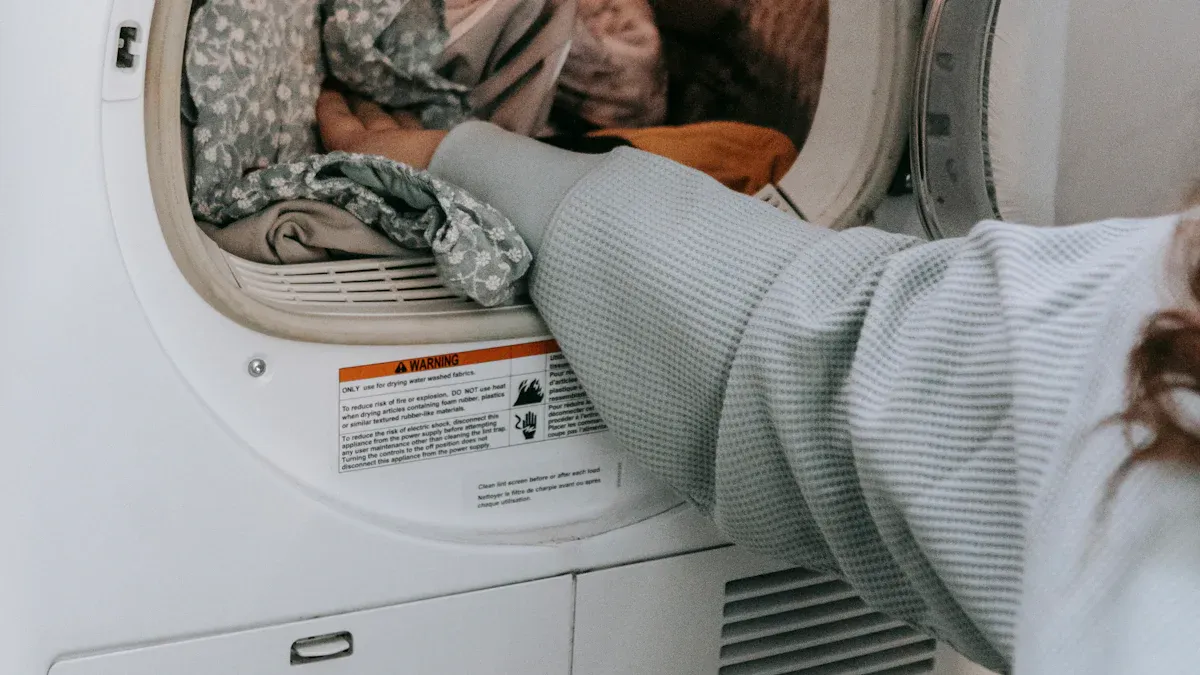
Wann die Reinigung des Heizelements hilft
Entfernen von Flusen und Ablagerungen
Sie sollten immer mit einer gründlichen Reinigung beginnen, bevor Sie den Austausch des Heizelements in Betracht ziehen. Flusen und Ablagerungen können sich um die Heizbaugruppe herum ansammeln und den Luftstrom behindern. Diese Ansammlung führt dazu, dass der Trockner überhitzt und Sicherheitsvorrichtungen wie die Thermosicherung auslösen kann. Verwenden Sie einen Staubsauger oder eine weiche Bürste, um Flusen aus dem Heizbereich zu entfernen. Achten Sie besonders auf Ecken und Spalten, in denen sich Flusen verstecken. Regelmäßige Reinigung verhindert Überhitzung und verlängert die Lebensdauer Ihres Samsung-Trockners.
Tipp: Reinigen Sie den Flusenfilter nach jeder Ladung. Diese einfache Gewohnheit reduziert die Brandgefahr und verbessert die Trocknungseffizienz.
Reinigung der Lüftungsöffnungen und -kanäle
Verstopfte Lüftungsöffnungen und -kanäle zwingen Ihren Trockner, härter zu arbeiten. Eingeschränkter Luftstrom führt zu längeren Trocknungszeiten und kann zu einem vorzeitigen Ausfall des Heizelements führen. Trennen Sie den Lüftungsschlauch von der Rückseite des Trockners. Verwenden Sie eine Lüftungsreinigungsbürste oder einen Staubsauger, um Flusen und Staub zu entfernen. Überprüfen Sie die äußere Lüftungsklappe, um sicherzustellen, dass sie sich frei öffnet. Planen Sie mindestens einmal im Jahr eine gründliche Reinigung des Lüftungssystems Ihres Trockners ein.
- Entfernen Sie den Lüftungsschlauch.
- Reinigen Sie das Innere des Schlauchs und des Wandkanals.
- Befestigen Sie den Schlauch wieder sicher.
Anmerkung: Schlechter Luftstrom ist eine Hauptursache für wiederholte Heizungsausfälle. Saubere Lüftungsöffnungen und -kanäle helfen, die Notwendigkeit eines Austauschs des Heizelements zu vermeiden.
Wann der Austausch des Heizelements erforderlich ist
Anzeichen, dass das Element ersetzt werden muss
Sie können bestimmte Anzeichen bemerken, die darauf hindeuten, dass ein Austausch des Heizelements notwendig ist. Wenn Ihr Trockner läuft, aber nie Wärme erzeugt, oder wenn Sie sichtbare Brüche oder Brandstellen an den Spulen sehen, ist das Element wahrscheinlich defekt. Ein Test mit einem Multimeter, bei dem kein Durchgang festgestellt wird, bestätigt die Notwendigkeit eines Austauschs. Auch wiederholtes Auslösen der Thermosicherung, selbst nach der Reinigung, deutet auf ein defektes Heizelement hin.
Häufige Anzeichen sind:
- Keine Wärme während eines beliebigen Zyklus
- Brandflecken oder gebrochene Spulen am Element
- Multimeter zeigt “OL” oder unendlichen Widerstand an
- Trockner heizt ungleichmäßig oder schaltet sich vorzeitig aus
Alarm: Ignorieren Sie diese Warnsignale niemals. Ein Aufschieben des Austauschs kann zu weiteren Schäden oder Sicherheitsrisiken führen.
Das richtige Ersatzteil für Ihren Samsung-Trockner finden
Beim Austausch des Heizelements müssen Sie das korrekte Teil für Ihr Samsung-Trocknermodell auswählen. Überprüfen Sie Ihr Benutzerhandbuch oder das Etikett im Inneren der Tür auf die Modellnummer. Verwenden Sie diese Informationen, um das exakt benötigte Heizelement zu bestellen. Viele Online-Händler und Elektrofachgeschäfte führen originale Samsung-Teile. Vermeiden Sie generische Ersatzteile, die möglicherweise nicht richtig passen oder funktionieren.
- Finden Sie die Modellnummer Ihres Trockners.
- Suchen Sie mit dieser Nummer nach dem passenden Heizelement.
- Vergleichen Sie die Teilenummern vor dem Kauf.
| Schritt | Aktion |
|---|---|
| Modellnummer finden | Überprüfen Sie die Innenseite der Tür oder die Rückseite |
| Nach Teil suchen | Verwenden Sie die Modellnummer für genaue Ergebnisse |
| Kompatibilität prüfen | Teilenummern vor dem Kauf abgleichen |
Tipp: Das alte Heizelement bis zum Abschluss der Reparatur aufbewahren. Sie können es mit dem neuen Teil vergleichen, um eine korrekte Übereinstimmung sicherzustellen.
Eigenreparatur vs. professionelle Reparatur des Heizelements eines Samsung-Trockners
Wann eine Eigenreparatur sicher ist
Sie können den Austausch des Heizelements selbst durchführen, wenn Sie sich mit grundlegenden Werkzeugen und elektrischer Sicherheit wohlfühlen. Ziehen Sie vor Beginn immer den Netzstecker des Trockners. Befolgen Sie die Schritte in Ihrer Bedienungsanleitung oder einer vertrauenswürdigen Reparaturanleitung. Tragen Sie Handschuhe und eine Schutzbrille, um sich zu schützen. Wenn Sie bereits auf das Heizelement zugegriffen und es getestet haben, verfügen Sie wahrscheinlich über die für den Austausch erforderlichen Fähigkeiten.
- Ziehen Sie den Netzstecker des Trockners.
- Entfernen Sie die erforderlichen Verkleidungsteile.
- Tauschen Sie das alte Heizelement gegen das neue aus.
- Bauen Sie den Trockner wieder zusammen und testen Sie ihn.
Anmerkung: Eigenreparaturen sparen Geld und Zeit. Fahren Sie nur fort, wenn Sie sich Ihrer Fähigkeiten sicher sind.
Wann ein Fachmann hinzugezogen werden sollte
Sie sollten einen Fachmann rufen, wenn Sie sich bei einem Schritt des Austauschs des Heizelements unsicher sind. Komplizierte Modelle, festsitzende Schrauben oder unklare Schaltpläne können die Arbeit erschweren. Wenn Sie verbrannte Verkabelung, wiederholte Sicherungsausfälle oder andere elektrische Probleme feststellen, kann ein qualifizierter Techniker das Problem sicher diagnostizieren und beheben. Eine professionelle Reparatur stellt sicher, dass Ihr Samsung-Trockner sicher und effizient arbeitet.
- Holen Sie sich Hilfe bei komplexen Reparaturen.
- Kontaktieren Sie einen Techniker bei elektrischen Problemen.
- Nutzen Sie autorisierte Serviceanbieter für Garantiereparaturen.
Alarm: Gehen Sie niemals ein Sicherheitsrisiko ein. Wählen Sie im Zweifelsfall die professionelle Reparatur für den Austausch des Heizelements.
Vermeidung zukünftiger Probleme mit dem Heizelement Ihres Samsung-Trockners
Regelmäßige Wartungstipps für Ihren Samsung-Trockner
Reinigen Sie das Flusensieb nach jeder Nutzung
Sie sollten immer Reinigen Sie das Flusensieb vor oder nach jeder Ladung. Flusensiebe fangen den größten Teil, aber nicht die gesamte Flusen Ihrer Wäsche auf. Mit der Zeit sammeln sich Flusen, die das Sieb passieren, im Inneren des Trockners und im Abluftsystem an. Diese Ansammlung behindert den Luftstrom, verlängert die Trocknungszeiten und erhöht das Risiko einer Überhitzung. Tatsächlich ist die unsachgemäße Reinigung des Trockners für 34 % der Trocknerbrände verantwortlich. Indem Sie die Reinigung des Flusensiebs zur Gewohnheit machen, helfen Sie, Verstopfungen zu vermeiden und Ihr Zuhause zu schützen.
Tipp: Entfernen Sie das Flusensieb, wischen Sie alle sichtbaren Flusen ab und prüfen Sie es auf Risse oder Beschädigungen. Ersetzen Sie das Sieb, wenn es abgenutzt ist, um die Spitzenleistung zu erhalten.
Planung von Tiefenreinigungen
Regelmäßige Tiefenreinigungen halten Ihren Trockner effizient und sicher. Flusensiebe fangen nur etwa 90 % bis 95 % der Flusen, sodass immer etwas Flusen in den Abluftkanal und das Gehäuse gelangen. Sie sollten mindestens ein- bis zweimal im Jahr eine gründliche Reinigung des Abluftkanals und des Trocknerinneren einplanen. Verwenden Sie einen Staubsauger oder eine Abluftbürste, um Flusen aus dem Abluftschlauch und dem Wandkanal zu entfernen. Überprüfen Sie die Trommel, die Trommeldichtungen und das Gebläserad auf Flusen oder Ablagerungen. Regelmäßige Tiefenreinigung verringert die Brandgefahr, verbessert den Luftstrom und verlängert die Lebensdauer Ihres Geräts.
| Komponente | Häufigkeit der Wartung | Grund/Nutzen |
|---|---|---|
| Flusensieb | Jeder Trocknungsvorgang | Verhindert Brandrisiko und erhält die Effizienz |
| Abluftkanal | 1-2 Mal pro Jahr | Reduziert Verstopfungen, verbessert den Luftstrom und senkt die Brandgefahr |
| Trommelreinigung | Nach Bedarf | Entfernt Flecken und beugt Gerüchen vor |
| Sensorleisten | Wenn die Programme zu kurz sind | Sorgt für genaues Trocknen und verhindert Energieverschwendung |
Richtige Verwendung Ihres Samsung-Trockners
Vermeidung von Überladung des Trockners
Sie sollten vermeiden, Ihren Trockner zu überladen. Große, schwere Ladungen blockieren den Luftstrom und zwingen das Gerät, härter zu arbeiten. Diese zusätzliche Belastung kann dazu führen, dass das Heizelement überhitzt oder ausfällt. Befolgen Sie stets die Richtlinien des Herstellers zur Beladungsgröße. Wenn Sie feststellen, dass Kleidung feucht bleibt oder die Programme länger dauern, reduzieren Sie die Beladungsgröße für bessere Ergebnisse.
Anmerkung: Überladung beeinträchtigt nicht nur die Trocknungsleistung, sondern erhöht auch den Verschleiß an Riemen, Rollen und Dichtungen.
Verwendung der richtigen Einstellungen für Stoffarten
Die Auswahl der richtigen Einstellungen für jede Stoffart hilft, unnötige Belastung Ihres Trockners zu vermeiden. Empfindliche Stoffe benötigen niedrigere Hitze, während schwerere Artikel höhere Temperaturen erfordern. Die Verwendung des richtigen Programms schützt sowohl Ihre Kleidung als auch das Heizelement. Wenn Sie die falsche Einstellung verwenden, riskieren Sie Überhitzung oder unzureichende Trocknung Ihrer Wäsche. Überprüfen Sie immer die Pflegeetiketten der Kleidungsstücke und wählen Sie das geeignete Programm.
- Verwenden Sie niedrige Hitze für empfindliche Stoffe und Synthetik.
- Wählen Sie hohe Hitze für Handtücher und schwere Stoffe.
- Vermeiden Sie die Verwendung von Zeitprogrammen für gemischte Ladungen.
Durch die Befolgung dieser Wartungs- und Nutzungstipps verringern Sie das Risiko von Problemen mit dem Heizelement und halten Ihren Trockner sicher und effizient in Betrieb.
Was tun, wenn Ihr Samsung-Trockner nach der Fehlersuche nicht heizt
Wann Sie professionelle Hilfe für Ihren Samsung-Trockner suchen sollten
Anzeichen, dass Sie eine Fachreparatur benötigen
Sie können an einen Punkt gelangen, an dem Ihre Fehlersuche die Heizung Ihres Samsung-Trockners nicht wiederherstellt. Bestimmte Warnsignale deuten darauf hin, dass Sie aufhören und einen Fachmann kontaktieren sollten. Wenn Sie eines der folgenden Anzeichen bemerken, ist eine Fachreparatur die sicherste Wahl:
- Der Trockner erzeugt immer noch keine Wärme, nachdem Sie das Heizelement, die Thermosicherung und den Thermostat überprüft haben.
- Sie sehen sichtbare Schäden wie Brandflecken, Blasen oder Risse am Heizelement.
- Der Trockner heizt ungleichmäßig oder benötigt viel länger als normal zum Trocknen der Kleidung.
- Sie nehmen elektrische Gerüche wahr oder hören ungewöhnliche Geräusche während des Betriebs.
- Das Multimeter zeigt keine Durchgängigkeit im Heizelement oder in den Sensoren an, selbst nachdem Sie Teile ausgetauscht haben.
Fachleute verwenden fortschrittliche Diagnosewerkzeuge, um Fehler zu bestätigen. Sie führen elektrische Durchgangs- und Temperaturkalibrierungstests durch, die über die grundlegende Fehlersuche zu Hause hinausgehen. Diese Methoden helfen, versteckte Probleme zu identifizieren, die bei einer Standardinspektion möglicherweise nicht sichtbar sind.
⚠️ Alarm: Anhaltende Heizprobleme können auf tiefere elektrische Fehler hinweisen. Der Versuch von Reparaturen ohne entsprechende Schulung kann Sicherheitsrisiken erhöhen.
Wie Sie einen qualifizierten Techniker finden
Sie möchten einen Techniker, der Samsung-Geräte versteht und die richtigen Diagnosemethoden anwendet. Achten Sie bei der Auswahl eines Reparaturdienstes auf diese Eigenschaften:
- Zertifizierung in der Reparatur von Haushaltsgeräten, insbesondere für Samsung-Produkte.
- Positiver Ruf und klare Servicegarantien.
- Verwendung professioneller Diagnosegeräte wie Multimeter und Kalibrierungswerkzeuge.
- Transparente Preisgestaltung und detaillierte Reparaturkostenvoranschläge.
Sie können auf der offiziellen Samsung-Website nach autorisierten Samsung-Servicezentren suchen. Auch lokale Reparaturunternehmen für Haushaltsgeräte können zertifizierte Techniker beschäftigen. Fragen Sie stets nach Erfahrung mit Ihrem spezifischen Trocknermodell.
| Nachweistyp | Beschreibung |
|---|---|
| Messdaten | Multimeter-Widerstandstests diagnostizieren Fehler in Heizelementen und Sensoren. |
| Benutzerberichte | Zu den Symptomen gehören keine Wärme, langsames Aufheizen oder ungleichmäßige Temperaturverteilung. |
| Visuelle Inspektion | Brandspuren, Blasen oder Risse an Heizelementen deuten auf einen Ausfall hin. |
| Stromversorgungsdaten | Reduzierte Spannung kann zu unzureichender Leistung der Heizelemente führen. |
| Professionelle Diagnose | Durchgangs- und Temperaturkalibrierungstests bestätigen Fehler an Elementen oder Sensoren. |
Garantie- und Supportoptionen für Samsung-Trockner
Überprüfung Ihrer Samsung-Garantie
Bevor Sie für Reparaturen bezahlen, prüfen Sie, ob Ihr Samsung-Trockner noch unter Garantie steht. Die meisten neuen Samsung-Trockner haben eine eingeschränkte Garantie, die Teile und Arbeit für einen bestimmten Zeitraum abdeckt. Garantiedetails finden Sie in Ihrer Bedienungsanleitung oder auf der Samsung-Website. Sie benötigen Ihre Modell- und Seriennummer, um die Abdeckung zu überprüfen.
- Finden Sie die Modell- und Seriennummer Ihres Trockners (normalerweise innen an der Tür oder auf der Rückseite).
- Besuchen Sie die Samsung-Garantieseite und geben Sie Ihre Informationen ein.
- Prüfen Sie, welche Reparaturen oder Teile die Garantie abdeckt.
💡 Tipp: Die Aufbewahrung Ihres Kaufbelegs und Ihrer Garantieunterlagen beschleunigt den Prozess.
Kontaktaufnahme mit dem Samsung-Support
Wenn Ihr Trockner unter Garantie steht oder Sie technische Beratung benötigen, kontaktieren Sie den Samsung-Support. Das Support-Team kann Ihnen helfen, einen Service zu vereinbaren, Ersatzteile zu bestellen oder Fragen zu Ihrem Gerät zu beantworten. Sie erreichen sie telefonisch, per Online-Chat oder über die Samsung Members App.
- Besuchen Sie die offizielle Samsung-Support-Website.
- Wählen Sie Ihr Produkt aus und beschreiben Sie das Problem.
- Folgen Sie den Anweisungen, um einen Service anzufordern oder Hilfe zur Fehlerbehebung zu erhalten.
Der Samsung-Support kann Sie mit autorisierten Reparaturzentren verbinden. Die Nutzung offizieller Kanäle stellt sicher, dass Ihr Trockner ordnungsgemäß gewartet wird und Reparaturen Ihre Garantie nicht ungültig machen.
Fehlerbehebung bei anderen häufigen Problemen mit Samsung-Trocknern
Samsung-Trockner startet nicht
Probleme mit der Stromversorgung
Wenn Ihr Samsung-Trockner nicht startet, sollten Sie zuerst die Stromversorgung überprüfen. Stellen Sie sicher, dass das Gerät fest eingesteckt ist. Untersuchen Sie die Steckdose auf Anzeichen von Beschädigung oder lockeren Verbindungen. Wenn Sie einen Schutzschalter verwenden, bestätigen Sie, dass er nicht ausgelöst wurde. Manchmal kann eine durchgebrannte Sicherung oder eine defekte Steckdose verhindern, dass der Trockner angeht. Testen Sie die Steckdose mit einem anderen Gerät, um sicherzustellen, dass sie Strom liefert. Wenn die Steckdose funktioniert, überprüfen Sie das Netzkabel auf sichtbare Abnutzung oder Schnitte. Ersetzen Sie beschädigte Kabel sofort, um elektrische Gefahren zu vermeiden.
⚡ Tipp: Ziehen Sie immer den Netzstecker, bevor Sie elektrische Komponenten inspizieren, um sich vor Stromschlägen zu schützen.
Probleme mit dem Türschalter
Ein defekter Türschalter kann ebenfalls verhindern, dass Ihr Trockner startet. Der Türschalter fungiert als Sicherheitsmerkmal und verhindert den Betrieb, wenn die Tür offen bleibt. Wenn der Schalter ausfällt oder falsch ausgerichtet ist, erhält das Bedienfeld kein Signal, um einen Zyklus zu starten. Öffnen und schließen Sie die Tür fest. Hören Sie auf ein Klickgeräusch, das anzeigt, dass der Schalter einrastet. Wenn Sie kein Klicken hören, muss der Schalter möglicherweise justiert oder ersetzt werden. Sie können ein Multimeter verwenden, um die Durchgängigkeit des Türschalters zu testen. Wenn der Test fehlschlägt, installieren Sie einen neuen Schalter, um die Funktion wiederherzustellen.
Ungewöhnliche Geräusche oder Gerüche vom Samsung-Trockner
Identifizierung seltsamer Geräusche
Sie können Folgendes feststellen: neue oder ungewöhnliche Geräusche während des Betriebs. Während etwas Lärm normal ist, deuten lautes Hämmern, Schleifen oder Quietschen oft auf mechanische Fehler hin. Abgenutzte Trommelrollen, lose Riemen oder Fremdkörper in der Trommel können diese Geräusche verursachen. Untersuchen Sie ungewöhnliche Geräusche umgehend. Das Ignorieren kann zu weiteren Schäden führen. Ein Gerätetechniker erklärt, dass ungewöhnliche Geräusche bei Samsung-Trocknern oft auf zugrunde liegende Fehlfunktionen hinweisen. Das frühzeitige Beheben dieser Probleme trägt dazu bei, einen sicheren und effizienten Betrieb zu gewährleisten.
- Hören Sie auf Veränderungen der Geräusche während jedes Zyklus.
- Inspizieren Sie die Trommel und umliegende Komponenten auf lose oder beschädigte Teile.
- Entfernen Sie alle in der Trommel gefundenen Fremdkörper.
Umgang mit Brandgeruch
A Brandgeruch, der von Ihrem Samsung-Trockner ausgeht erfordert sofortige Aufmerksamkeit. Dieser Geruch deutet oft auf Luftstromprobleme hin. Beschädigte oder lose Gebläseräder, falsch ausgerichtete Paneele oder Dichtungen oder angeschwärzte Flusen in der Brennkammer können den Luftstrom stören. Wenn der Luftstrom unzureichend wird, kann die Flamme kurzzyklisch werden und einen Brandgeruch erzeugen. Kurzzyklisches Verhalten tritt auf, wenn die Flamme sich nicht selbst aufrechterhalten kann, was Sicherheitsabschaltzyklen auslöst. Schalten Sie das Gerät aus und überprüfen Sie das Belüftungssystem auf Verstopfungen. Reinigen Sie Flusenansammlungen und überprüfen Sie beschädigte Dichtungen oder Paneele. Wenn der Geruch anhält, kontaktieren Sie einen qualifizierten Techniker, um Brandgefahren zu vermeiden.
🚨 Alarm: Ignorieren Sie niemals Brandgeruch. Schnelles Handeln schützt Ihr Zuhause und gewährleistet einen sicheren Betrieb.
Sie haben jetzt einen klaren Prozess zur Fehlerbehebung bei Heizproblemen. Beginnen Sie mit grundlegenden Überprüfungen und Sicherheitsschritten. Inspizieren und testen Sie Komponenten, bevor Sie Teile ersetzen. Regelmäßige Reinigung und ordnungsgemäße Verwendung helfen, zukünftige Probleme zu vermeiden. Wenn Sie anhaltende Fehler oder elektrische Schäden bemerken, kontaktieren Sie einen qualifizierten Techniker. Ihre Aufmerksamkeit für Wartung und Sicherheit gewährleistet zuverlässige Leistung.
FAQ
Wie oft sollten Sie den Flusenfilter Ihres Samsung-Trockners reinigen?
Sie sollten den Flusenfilter nach jeder Ladung reinigen. Diese Gewohnheit hält den Luftstrom stark und hilft, Überhitzung zu vermeiden. Regelmäßige Reinigung reduziert auch die Brandgefahr und verbessert die Trocknungsleistung.
Kann man ein Samsung-Trockner-Heizelement selbst austauschen?
Sie können das Heizelement ersetzen, wenn Sie sich mit grundlegenden Werkzeugen und Sicherheitsschritten wohlfühlen. Ziehen Sie immer zuerst den Netzstecker. Wenn Sie unsicher sind oder elektrische Schäden sehen, kontaktieren Sie einen Fachmann.
Was bedeutet der Fehlercode “HE” bei einem Samsung-Trockner?
Der Code “HE” signalisiert ein Heizproblem. Sie sollten das Heizelement, den Thermistor und das Belüftungssystem überprüfen. Reinigen Sie zuerst den Flusenfilter und die Lüftungsschlitze. Wenn der Code bestehen bleibt, testen Sie das Heizelement und die Sensoren.
Warum löst Ihr Samsung-Trockner ständig die Thermosicherung aus?
Häufige Ausfälle der Thermosicherung deuten oft auf schlechten Luftstrom hin. Flusenansammlungen im Lüftungssystem oder Trockner können Überhitzung verursachen. Reinigen Sie regelmäßig den Flusenfilter, den Lüftungsschlauch und die Kanäle, um dieses Problem zu vermeiden.
Wie testen Sie ein Heizelement eines Samsung-Trockners mit einem Multimeter?
Stellen Sie Ihr Multimeter auf die niedrigste Ohm-Einstellung. Berühren Sie eine Sonde an jedem Anschluss des Heizelements. Ein Messwert zwischen 10 und 50 Ohm bedeutet, dass das Element funktioniert. “OL” oder kein Messwert bedeutet, dass ein Austausch erforderlich ist.
Was sollten Sie tun, wenn Ihr Samsung-Trockner nach Verbrennung riecht?
Schalten Sie den Trockner sofort aus. Überprüfen Sie auf Flusenansammlungen in der Trommel, im Lüftungssystem und im Heizbereich. Reinigen Sie alle Flusen und Ablagerungen. Wenn der Geruch anhält, rufen Sie einen qualifizierten Techniker, um elektrische oder mechanische Probleme zu überprüfen.
Deckt die Garantie eines Samsung-Trockners den Austausch des Heizelements ab?
Die meisten Samsung-Garantien decken den Austausch des Heizelements innerhalb des Garantiezeitraums ab. Überprüfen Sie Ihre Garantiebedingungen und Modellnummer. Kontaktieren Sie den Samsung-Support, um die Abdeckung zu bestätigen und autorisierte Reparaturen zu vereinbaren.
Wie können Sie zukünftige Ausfälle des Heizelements verhindern?
Sie können Ausfälle verhindern, indem Sie den Flusenfilter nach jeder Nutzung reinigen, gründliche Reinigungen planen und Überladung vermeiden. Verwenden Sie die richtigen Einstellungen für jeden Stofftyp. Regelmäßige Wartung hält Ihren Trockner sicher und effizient in Betrieb.